Monday, 3 April 2017

10 smart way to create backlinks

Because that traffic is directly related to the quality of the backlinks your website has, the more authoritative websites that link to you, the better rankings and traffic you’ll get.
And of course you want to keep an eye on your Google rankings. When crawling the web, Google looks in particular for your website’s backlinks, to understand how your pages are connected to one other and in what ways. Certainly there are hundreds of ranking factors. But backlinks represent the most important metric for SEO.
Now, needless to say, quality backlinks are hard to get, but they shouldn’t be. In fact there are smart ways to build or earn backlinks, to get authoritative websites to link to your online business. Here are ten:

1. The broken-link building method

I love the broken-link building method because it works perfectly to create one-way backlinks. The technique involves contacting a webmaster to report broken links on his/her website. At the same time, you recommend other websites to replace that link. And here, of course, you mention your own website. Because you are doing the webmaster a favor by reporting the broken links, the chances of a backlink back to your website are high.
So, to use the broken-link method, first find relevant websites in your niche that have resources pages. Find them by using these search queries in Google:
  • your keyword + links
  • your keywords + resources
  • keywords inurl:links
For example, if I have a parenting website, I'll search for parenting + links.
To easily find broken links on those pages, download and install the Google Chrome plugin called Check my Links. Using this plugin, I quickly discovered all 404 links from this page:
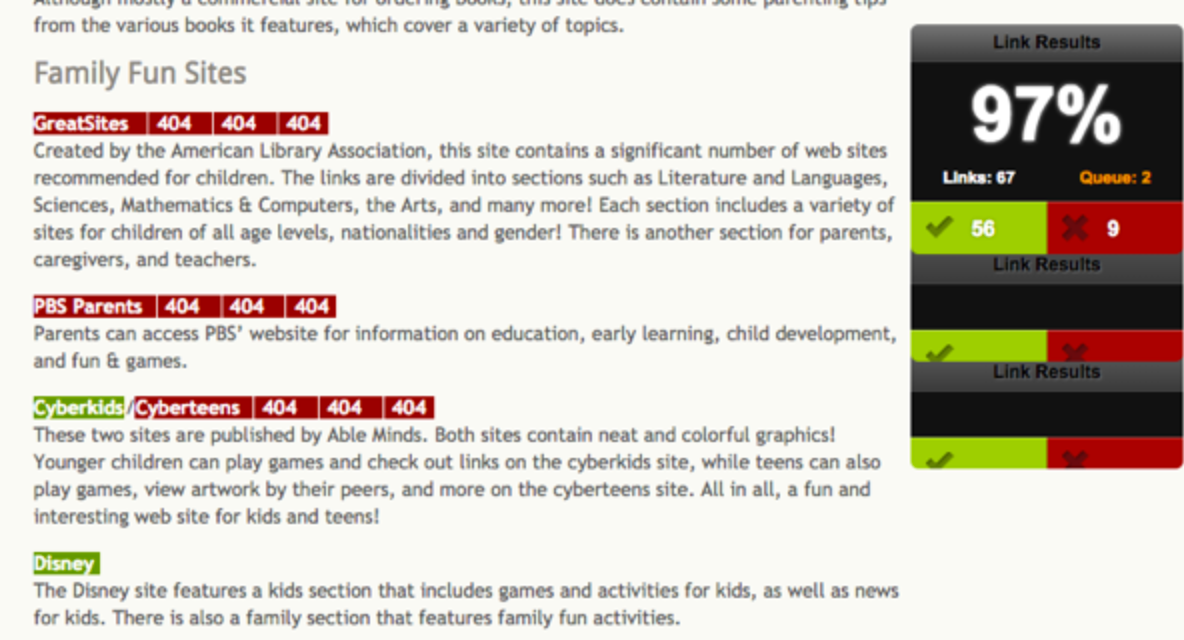
Now, back to that webmaster: When reaching out, be friendly and introduce yourself. Tell this individual that he or she is linking to some resources that are no longer available. Always provide the exact location of the broken links, so they can be easily found. Give some alternatives to replace those links, including your own website. Try to be helpful, not greedy to get a backlink. Often, this method will work, but there will be cases when the webmaster will refuse to link back to you.

2. Backlinks through infographics

Infographics are one of the most popular methods for bringing traffic to your website and gaining valuable backlinks. They're also great because they're easy to understand and share. Everyone loves visual data, right? That's why the demand for infographics has increased considerably. Consider that influential online publications like Mashable publish numerous infographics from all over the Internet.
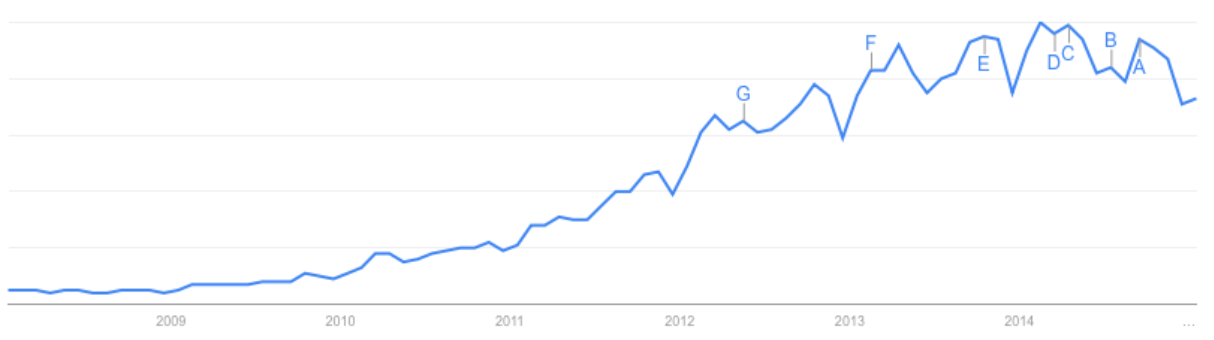
Now, choose your infographics carefully: Each one should include a unique and interesting story for your audience. To make your selection, follow currently trending topics and see what people are looking for, then create your infographic using statistical data.
To get started, research and gather data for the content. Then find someone to make your content visual.
There’s a misconception that creating an infographic is expensive; that's not always the case. Figure on an average price between $150 and $300. Assuming you may earn 10 backlinks per infographic, you'll be paying $15 per link. For five backlinks, the price will be $30 per link. That’s very cheap for backlinks earned through webmaster moderation. And if your infographic goes viral. you win even more.
Try using Dribble to find designers with good portfolios. Contact them directly by upgrading your account to PRO status, for just $20 a year. Then simply use the search filter and type "infographics." After finding someone you like, click on "hire me" and send a message detailing your needs and requesting a price. Fiver is another place to find great designers willing to create inexpensive infographics.
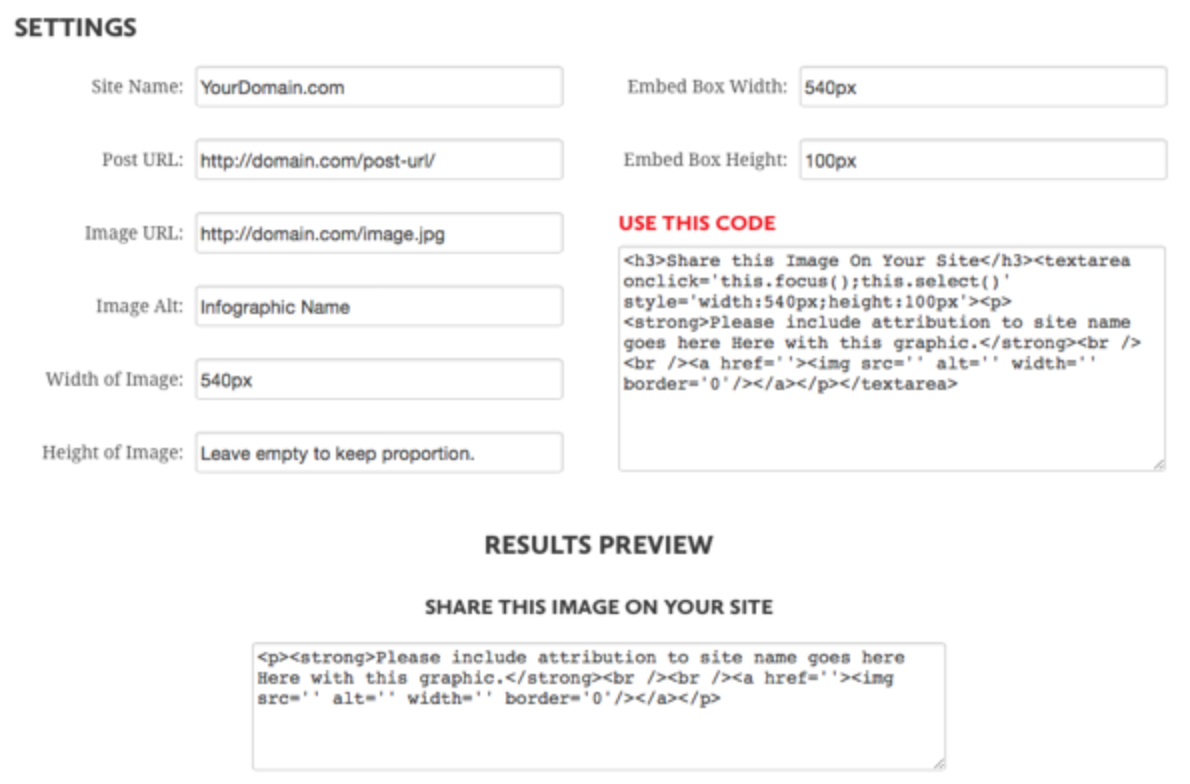
Next, once the infographic is ready, you need to make it easy for others to share it. To do this, create your own embed code using Siege Media generator.
Once everything is in place, and your infographic shines on your website, it’s time to distribute it. There are numerous infographic directories where you can submit yours. For example,
pinterest.com is best example
Last but not least, do email outreach to people who have previously linked to similar infographics or have shared them on social media. Ask for feedback on your infographic, but never ask for a link directly. If they like your infographic, they'll know what to do.

3. The advantage of guest articles

Guest blogging is the most effective way to reach new audiences. By publishing articles on other popular websites, you'll get your content in front of new readers and win more exposure. Sometimes, it’s not just about the backlink, but about increasing your online reputation or your social media followers. 
Guest blogging helps you leverage your relationships and expand your audience. In case you have doubts about guest posting, consider that even Google accepts guest contributors on its Google Analytics blog. Here’s a tweet from Google showing this:
Numerous ways exist to find websites that accept guest articles. Here are three::
Use Google search queries to find blogs accepting guest contributors:
  • your keyword + inurl:write-for-us
  • your keyword + guest-posts
  • your keyword + inurl:guest-post-guidelines
  • your keyword + become a contributor
  • your keyword + bloggers wanted
  • your keyword + submit an article
  • your keyword + want to write for
  • your keyword + contribute
  • your keyword + become an author
  • your keyword + guest post by
  • your keyword + now accepting guest posts
Find influencers publishing guest posts on a regular basis and try to contribute on the same websites they've had in the past.
Consider the example of a profile by freelance writer . From her Google Plus profile, click on "About," then scroll to the contributor section, where you can see a list of all the websites  where writer has contributed articles to.
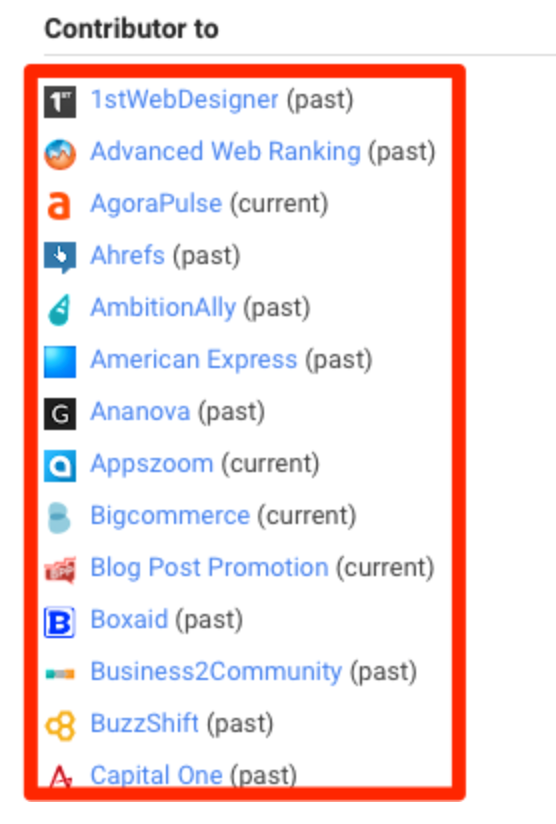
Repeat the process with other influencers, and you’ll find endless opportunities to publish content on third-party websites.
Use social media to discover other options.
On Twitter, search for "guest post," "guest article" or "guest author." To automate the process, use Topsy to set alerts for the keywords you want to track.
When publishing a guest article, always make sure you are linking to your social media profiles. If someone enjoys your post, he or she can easily follow you for similar future articles.

4. Spy on your competitors.

If you are serious about getting more organic traffic, staying up to date with your main competitors' online marketing strategies is mandatory. You have to spy on your competitors on social media and look for their link-building or earning techniques, as well as their content-marketing methods. Here are some tips:
Set yourself up for alerts when competitors are publishing new content on their websites. 
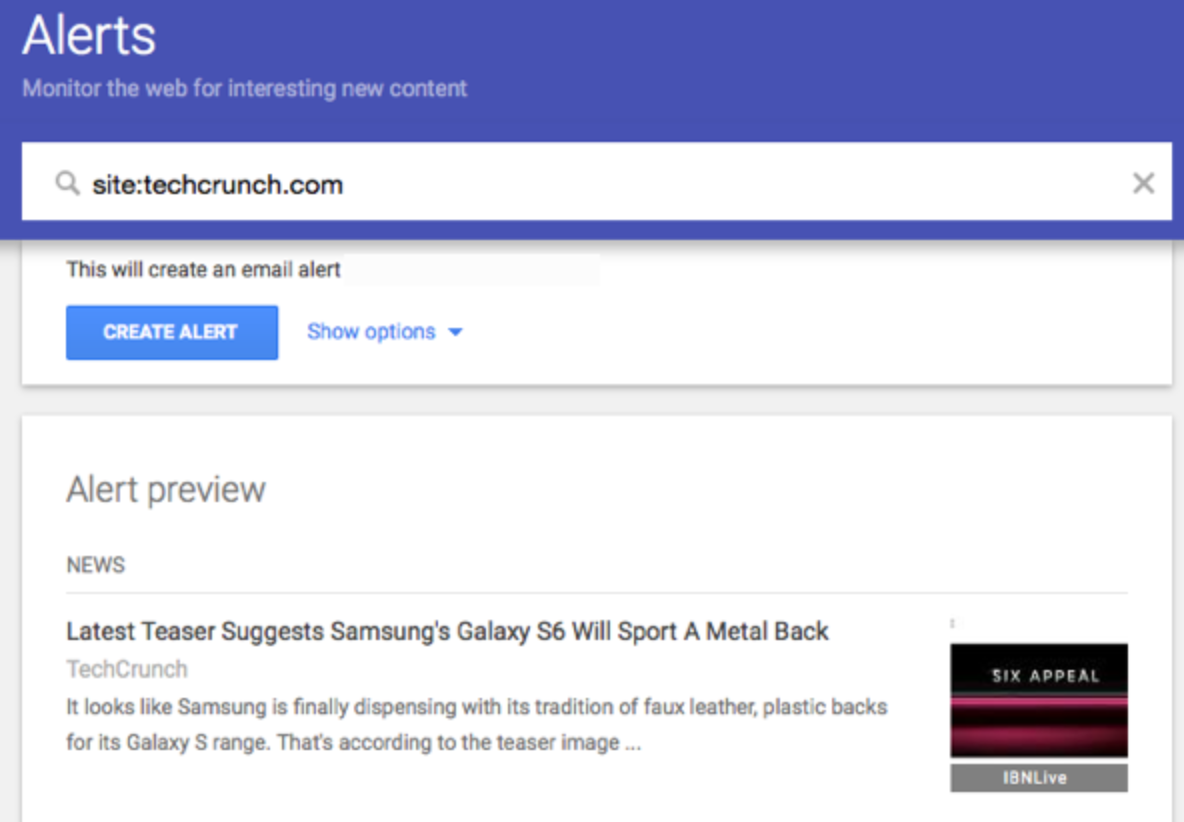
Subscribe to their email newsletters or follow them on social media. Another smart way to catch up with their new content is to create a Google alert for the keyword “site:yourcompetitor.com." For example, if my competitor is TechCrunch, I can set a Google alert using the keyword: site:techcrunch.com
Know when and what backlinks your competitors are building or earning.
This will help you replicate their best backlinks and better understand what methods they are using to promote their website. If they are getting links through guest blogging, try to become a guest author on the same websites. If most of their links come from blog reviews, get in touch with those bloggers and offer them a trial to test your tool. Eventually, they might write a review about it.
My favorite tool to spy on my competitors' backlinks is called Monitor Backlinks. It allows you to add your four most important competitors. From then on, you get a weekly report containing all the new links they have earned. Inside the tool, you get more insights about these links and can sort them by their value and other SEO metrics. A useful feature is that all the links my own website already has are highlighted in green, as in the screenshot below.
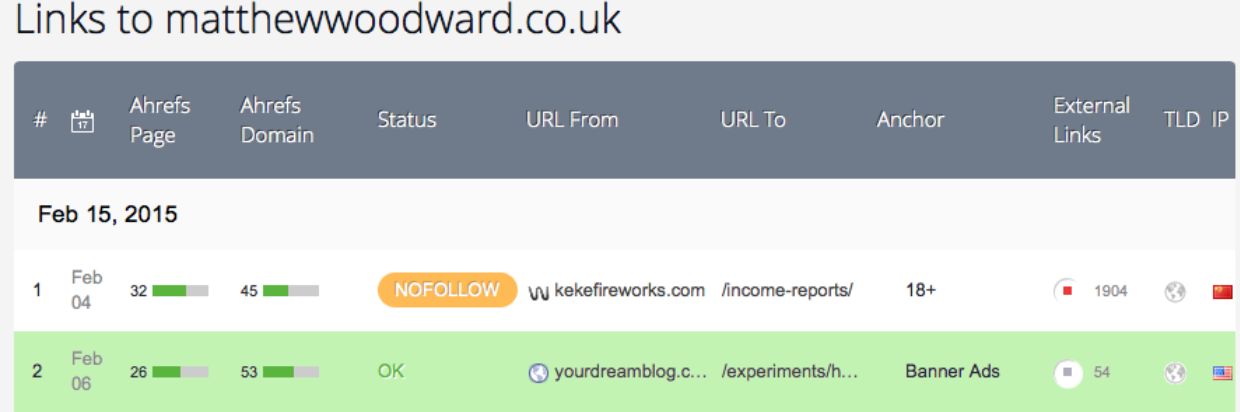


Using this technique, I can easily determine new link-building opportunities. With Monitor Backlinks, I can keep track of all the backlinks my website is earning. Each time my link building campaigns are successful, I can see all the new backlinks I’m getting in my dashboard.  

5. Build internal links.

Internal links are a key factor for running a successful blog. They are passing link juice, and you can use your anchor texts. With a good internal linking structure, you can help users easily navigate through your website and increase the overall user experience.
There are tools that can automatically create internal links on your blog, especially if you are running Wordpress, but you should do this manually. Microsoft's Matt Cutts has recommended that webmasters keep their number of internal links per page below 100, for both usability and SEO.

6. Promote your content.

Great content won’t get you backlinks unless you know how to promote it right. You have to get out in the world and do email outreach to promote your best articles.
One of the best strategies to do this is to contact bloggers or websites running weekly or monthly roundups. Again, you can use Google and search for queries like “keyword + roundup.” Make sure you choose, in order to see results only from the past week or month.
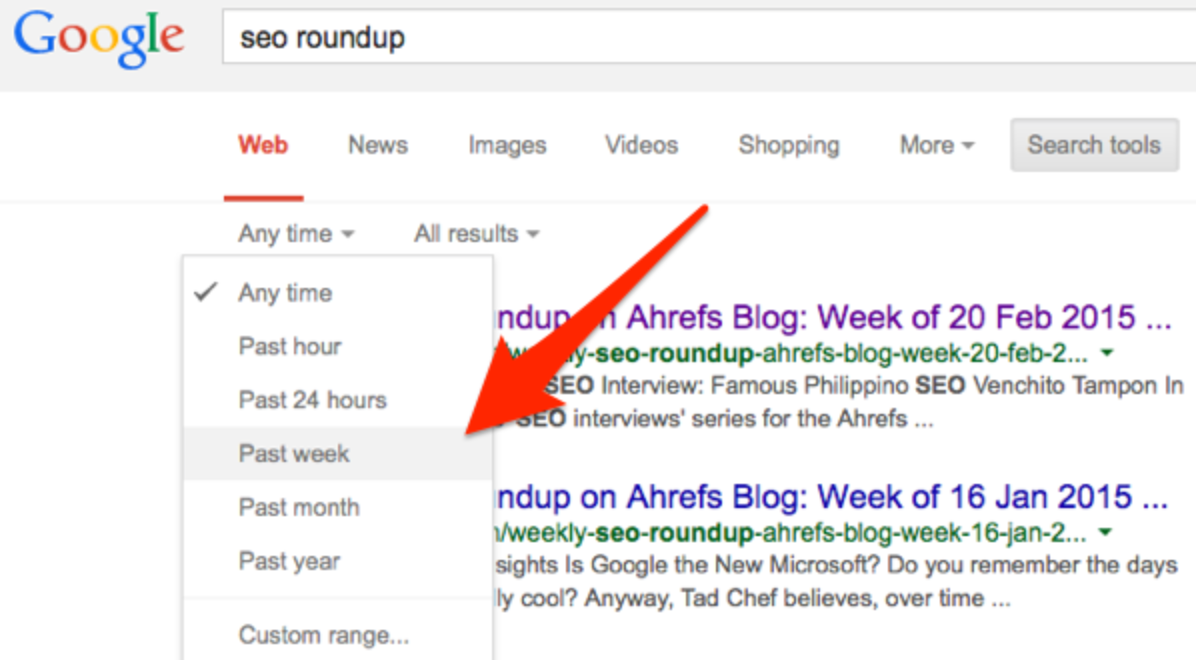
Then contact the webmasters and give them a quick introduction to your website. With your message, send a link to one of your best tutorials or guides. If they find your resource useful, they may link back to you in their next weekly roundup.These bloggers are constantly looking for great content, so they definitely want to hear from you.
As with the other techniques, make sure you do not abuse your relationship with any webmaster by asking for a link directly.

7. Write testimonials.

An easy method to earn quality backlinks is to write testimonials for websites you are using. You'll spend only a few minutes, and you can earn a link from the homepage of an authoritative website. As long as you are a customer of that product, there’s a high possibility you can get a link in exchange for a testimonial.

List all the tools you are currently using and reach out to discuss the likelihood of featuring your testimonial on a desired website.

8. Contact journalists and important bloggers.

To get links to your website, you have to spread the word about your business. And what better way to do this than email outreach to journalists and influencers from your niche? Fnding someone’s email address can be challenging, but there’s no reason to be discouraged. Here’s how to find anyone's email address:
  • Over 90 percent of the email addresses at publications and websites are formatted like this: john@website.com or sjohn@website.com or smith.john@website.com. So, try sending your pitch to these emails directly.
  • If the above formats don't work, use tools like VoilanorbertThrust.io or Emailfinder.io. Just enter the name of the person you are trying to contact and the website he or she works for.
  • Alternately, you can send your message using social media, with Google Plus or Linkedin.
Also consider that every pitch should be short and to the point. No one has time for long and boring emails from strangers.

9. Donate.

Yes, you can earn backlinks by donating to nonprofit organizations. This method is quick and straightforward. All you have to do is find websites in your niche that accept donations and link back to sites that have donated. Simply submit the amount of the donation you want to make and write your website URL.
Finding these websites requires some searches in Google. These are some queries that usually give good results:
  • contributors page + donate + your keyword
  • donation + contributors + your keyword
  • contributors page + your keyword

10. Get interviewed.

Online interviews are hot right now, and a great and easy way to earn backlinks to your website. Once you become the authority in your niche, you'll get lots of interview invitations, but until then, to get started, you have to make the first step. Look for websites that are running interviews and tell them you would like to participate and what knowledge you can contribute.

broken links strategy? & The broken link building process

What is the broken links strategy?1

The broken link building process is used by many SEO agencies and experts to build quality one-way backlinks. How can you do this? Easy! Here’s how the process goes:
You search for broken links on websites in your niche. Most likely these links will be found on “r2esource” pages.
When you find a broken link, email the webmaster and notify about the problem. Nobody likes 404 pages, and it’s also considered an SEO problem to link to pages that don’t exist.
In the email approach, suggest the webmaster to replace the broken link with your website. Because you have done a favor and told them about this problem, it’s more likely that they will link to you. Your website must provide valuable information in the same niche as the broken link.
Repeat this process!
Now the questions that probably come to your mind are:
Do I have to check for broken links manually?
How do you find sites that have broken links?
How to approach the webmaster?

How to check for broken links on a page

Install the plugin “Check My Links” for Chrome.
broken links plugin
This plugin will run all the links on the website and highlight the broken links with red. Instead of having to check all the links manually, this helps you automate the process.
When you are on the page where you want to verify the links, click on the plugin icon.
 check broken links
If you don’t use Google Chrome or you want to do complex searches for broken links, use our HTTP Header Status Checker Tool.
HTTP header status checker tool at monitor backlinks

How to find potential websites with broken links

Most of the time, you will find these backlinks on resource pages, where webmasters tend to link to websites or articles. There are numerous .edu and .gov websites that have this page, and you can approach those, as well. I will show you an example on how you can find broken links from dog websites.

So, to use the broken-link method, first find relevant websites in your niche that have resources pages. Find them by using these search queries in Google:
  • your keyword + links
  • your keywords + resources
  • keywords inurl:links
&  also  You can use these footprints in Google:
“Your keyword” + inurl:links
“Your keyword” + inurl:resources
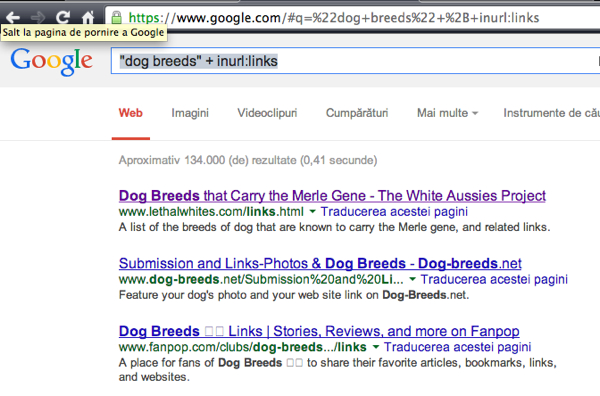
Do a search on Google for: “dog breeds” + inurl:links
Broken links footprint
As you can see, there are thousands of websites that have resource pages. Now let’s check the first one. Click on the “Check My Backlinks”1 plugin and wait for the results.
broken links
I just found 22 broken links on the first page I just checked. That’s my first opportunity. It takes about 30 seconds to verify each page. Check as many websites as you can, and create a list with the ones where you find broken links.

How to approach the webmasters and request for a link1

Now that you have created a list with the websites that have broken links, you will have to contact the webmasters. Your goal is to convince them to switch the broken links with your URL. Follow these tips:
1. Present yourself as a business owner that works in the industry. Let them know that the website they link to it’s no longer available and mention your website as an alternative resource. If you are trying to approach big brands of blogs, make sure you point to the benefits of adding your website.
2. Focus your attention on helping the webmaster, instead of concentrating on your SEO goals. Make them understand why they should remove those links.
3. You can also act like a fan of their website that has found this problem. Offer some alternatives, and include your website.
4. Try to find the name of the webmaster, and customize your email as much as possible. Don’t make your email look like a spammy template.

How To Build Quality Backlinks With Infographics

How To Build Quality Backlinks With Infographics

It’s no secret that infographics are popular. Chances are you’ve seen at least one in the last week.
Well-known websites all over the world use infographics, and they often go viral on social media. More importantly, a good infographic can help you build quality backlinks and enhance your website’s SEO2.
If you are searching for new methods to build backlinks from authoritative domains, infographics might be the solution for you. Keeping reading this post, as I’m about to show you how to build links using infographics. It’s one of the hottest and best ways to drive one-way backlinks to your website.
You ready?
Great, let’s do this.

What makes an infographic go viral?

While there’s no secret formula to make an article or an infographic go viral, there are some key aspects all share. These are the common elements viral infographics have:
  • Great design. If your infographic has an eye-catching and outstanding design, you are up for a good start.
  • Well researched and statistical data perform well. Infographics are a visual representation of data. A good infographic has to give useful and researched statistical data about popular topics.
  • Outreach and promote the infographic. Just like the regular content, simply by publishing an article, you won’t have much success unless you do your best to promote it.

Getting started with your first infographic

First you have to choose a topic. If you already have something in mind, do some research and see what infographics are already covering that topic. Let’s assume I want to create an infographic about the most important SEO ranking factors.
It would be wise to check what infographics are already available. Doing a search on Google for “ SEO Ranking factors infographic “, reveals the infographics that have performed well in terms of backlinks acquisition.
search for existing infographics
Get to know what infographics others have done already, and make sure yours will be ten times more informative and attractive.
Create a document and collect all the data and information you need for your infographic. Use a unique approach and try to address readers’ problems. Think about your audience and how would your infographic help them solve a problem. The content of your infographic has to have killer content and data.
Make sure to cite sources when needed.

How to create a good infographic

After you are done documenting the content for your infographic, it’s time to put your data into a nice design. Remember that a good mix of informative data and design can make the difference between a regular infographic and one that goes viral and earns backlinks from authoritative websites.
If you are like me, design might not be your best skill. Hence why it’s better to outsource the designing process to professionals that have greater experience.
My go to place for infographics and any design work that I need to be done is Fiverr. Contrary to popular belief, you can find some great designers on Fiverr that can create awesome infographics for cheap.
and also  go this link for best tool for creating info graphics images:
http://seotricksforwebsite.blogspot.in/2017/03/free-image-creation-tools.html
Search through their portfolio and find the ones with good reviews and great work. While some might do a great job for $5, others will need you to purchase gig extras for a better design.
find designers for infographics
Alternately, if Fiverr is not your thing, you can search for designers on DribbleElanceGuru or UpWork.

Publish your infographic and help it be successful

Uploading and publishing your infographic on your website is often not enough.
You have to make it easy for others to share it.
These are the things you have to do to increase the chances of earning backlinks and shares on social media:
  1. Create an embed code for your infographic, use the SiegeMedia Embed Code Generator.create embed code for infographic
    It’s very straight-forward and easy to do. After adding the generated code on your site, it will look like this:infographic embed code
  2. Make your infographics easy to share on social media by using the Image Sharer App from SumoMe.When someone holds the mouse over the infographic, they’ll be given social media sharing icons, as in the screenshot below.infographic sharing icons
  3. Always publish a content version of the infographic as well. It will help Google crawl the content, and you can rank for some new keywords. Usually, it’s best to have the infographic at the top of the article, and the contextual part at the bottom.

Promote your infographic

Unless you own an extremely popular website followed by tens of thousands of people and journalists, you’ll not have great success with your infographic before you promote it.
These are some of the most popular ways to promote your newly published infographic:
  1. It comes without saying that you have to start promoting your infographic by sharing it with your social media accounts.
  2. Submit a press release. A press release is a great way to tell the story behind your infographic and how it has impacted your readers. Journalists follow press releases1, and if your infographic provides value, you might be featured in great online publications. The most popular press release websites are PRWeb, PR Leap, and PR Newswire. Don’t consider doing press releases if your infographic design and data are average.
  3. Submit your infographic to directories. Here’s a list of the most popular infographic directories, sorted by their fees.
  4. Contact influencers that can help your infographic go viral. Use Topsy to determine who has previously shared similar infographics and get in touch with them on Twitter. Ask for feedback on your latest work, but never ask them directly to share and promote your infographic.If they like your infographic, you might earn a share from someone with a good authority, and also increase the chances of earning backlinks.
  5. One of the most important parts of promoting your infographics is to email bloggers that frequently publish infographics on their websites.You can either use Google to find such bloggers or analyze the backlinks your competitors have gotten with their infographics.Be kind, friendly and make the outreach process look natural. Your goal is to get bloggers to write about your infographic and get more exposure. A good infographic will get a good feedback and earn backlinks if outreach is done right.If the content is king, promotion is the queen.

Measure the success of your infographic

The ultimate goal of an infographic is to get more visitors to your website and earn backlinks that might help you rank higher in Google.
Measuring the success of your infographic campaigns is at least as important as planning them. In order to improve and get better, you have to know what worked well and what didn’t.
Use Monitor Backlinks to get daily alerts when your website earns new backlinks. When someone publishes your infographic, you have to know ahead of time and thank them immediately. This way, you can build a relationship with the blogger, and make connections for your future campaigns.
daily alerts from monitor backlinks
When your infographic is published on other sites, check Google Analytics and see what website has sent the most traffic your way.

backlinks with our SEO tool. Spy your competitors and keep track of your keyword rankings in Google. 

Guest Blogging Strategies

How to find guest blogging opportunities

When you are searching for sites that are accepting guest contributors, your main objective is to find relevant sites to your niche and industry.
Below you’ll find the best ways to find sites that might accept you as a contributor.

1. Analyze and spy competitor’s backlinks

You can find lots of new opportunities to build backlinks and sites that are accepting guest posts, by analyzing the links of your competitors.
Grab your most important competitors, and search through their backlinks to see if they are doing guest blogging. If they do, add their URL to your Monitor Backlinks account to get a list of all their backlinks. Every ten days, you’ll get a report with the new backlinks they have built, so you can keep up with their guest blogging campaigns.
competitors-backlinks-compressor
To find the best guest post opportunities using this method, you can sort their backlinks by their value. Use Domain Authority, MozRank, Page Authority and Ahrefs Rank.
As mentioned above, don’t waste your time writing for sites that have a lower domain authority than your site.

2. Use Google searches

Besides the popular guest blogging footprints like “keyword” + “Write for us”, you can use Google searches to find many more sites that are accepting guest posts. Below you’ll find the best guest post footprints to use in Google.
  • keyword “guest post opportunities”
  • keyword “guest post”
  • keyword “submit a guest post”
  • keyword “accepting guest posts”
  • keyword “guest post guidelines”
  • keyword “contributor guidelines”
  • keyword “write for us”
  • keyword “write for”
  • keyword “add blog post”
  • keyword “submit an article”
  • keyword “send your article”
  • keyword “send your post”
  • keyword “bloggers wanted”
  • keyword “want to write for”
  • keyword “become an author”
  • keyword “become a contributor”
  • keyword “guest post by”
  • intitle:guest post guidelines + keyword
  • intitle:guest-posts + keyword
  • intitle:write for us + keyword
You can use the ~ operator before your keywords to search for synonyms. For example, the search for “~animals”, will include words like “dogs”, “cats”, “horses”, etc.
You can also use custom phrases to search for your footprints inside titles or URLs. For example, intitle:write for us + keyword, will search for sites that have the words “write for us + your keyword” in their title tag. You can do the same to search on the URL, with inurl:write-for-us.
find-guest-blogging-opportunities
Play with all these footprints and be creative.

3. Search for the most popular blogs in your industry

You can send your pitch and ask to become a contributor even on sites that don’t have a “write for us” page. Often, these websites will be more valuable, and they will have a better impact on your SEO and send more referring traffic.
For virtually every niche, bloggers have created lists of the most popular blogs. To find these blogs, use these searches in Google:
  • top 100 blogs “keyword”
  • most popular blogs “keyword”
  • top blogs “keyword”
Here’s an example:
most-popular-blogs

4. Check what other guest bloggers do

Once you find a reputable site that’s accepting guest contributors, grab the name of the last guest authors, and follow them on social media. Do some research to see for what other websites they wrote before.
You can also create a list on Twitter to follow them. Often, when they publish a new guest post, it will be shared on their social media profiles.

Thursday, 30 March 2017

how to add a place in google map


(1)First go to url   google.com/mapmaker/


(2)then click on Add new  and under Add new there is option for Add Place click on that:

(3)after click on add place you will get   following screen  enter your place  find it and use positioning marker   to  locate your place

(4)Then  select your Category


(5)Enter your category and enter your place name  and click on continue :


Wednesday, 29 March 2017

how to Apply for Google Adwords Certification Exam

(1) First go to following url and click on join now:


(2) Enter   your  gmail id and password:


(3)Then Go under Certification  section   & click on Adwords:

(4) Then you will see  Adwords Fundamentals links  click on Exam details :


(5)After  click on Exam details you will see  Take Exam  on right hand side click on  "Take Exam".


(6)then you will see following  & Click on Start Exam Now  :